
 VIAMETRIX Product · Creo Add-on
Upload Your CAD File, Get Your Quoted Price in Minutes
VX CostEstimator automatically analyzes your CAD model, determines which manufacturing process it belongs to, and calculates material and labor costs. The result is a professional quote ready to send to your customer within minutes.
Four Steps to a Cost Estimate
No manual data entry, no spreadsheets to fill in. Just upload your CAD model — VX CostEstimator analyzes the geometry, calculates the manufacturing cost, and prepares your quote within minutes.
Machining, sheet metal and welded fabrication — every manufacturing process is priced fast and consistently by the same intelligent engine.
VX CostEstimator imports the open model directly from Creo Elements/Direct Modeling, Creo Parametric or Onshape with a single click, or reads a .STEP / .STP file to kick off the analysis automatically.
Holes, pockets, slots, chamfers, sheet thickness and bends are detected automatically; machine hourly rates, material cost and secondary processes are calculated to produce a customer-ready quote.
01 — Input
Send it in with a single click from Creo, CED or Onshape, or drag and drop your STEP file.
02 — Analysis
Geometry is analyzed automatically; the manufacturing method and machine are determined.
03 — Pricing
Material, labor, coating and profit margin are calculated automatically.
04 — Output
The quote report is exported as a 3D view, PDF, Excel or DXF and archived for later.
Four Modules — the Right Calculation for Every Process
Every manufacturing method has its own costing logic. Sheet metal parts are priced from flat-pattern, bend and cut data; machined parts from machining features, machine selection and cycle times; welded fabrications from weld seams and assembly operations.
Whether it's a single part or a full assembly, VX CostEstimator analyzes every manufacturing process according to its own rules and produces the correct cost estimate automatically.
Automatically cost single parts and full assemblies
VX CostEstimator analyzes the model to determine which machine the part will run on, calculates machining time, and rolls everything into a single quote.
- Automatic machine selection — lathe, mill or multi-axis machining based on geometry
- Assembly and BOM analysis — automatically breaks down STEP assemblies with hundreds of parts
- Machining feature detection — holes, pockets, slots, chamfers
- Coating and secondary processes — nickel, chrome, anodizing, heat treatment, grinding
Cost cutting, bending and punching together
Generates the flat pattern, detects material thickness from the model, and prepares manufacturing-ready data.
- Automatic flat pattern — thickness, bend count, cut length and blank size
- Hole and cutting cost — includes punch/laser operations
- Manufacturing-ready DXF/DWG — cutting and bend layers kept separate
- Smart K-Factor — automatic by material, fully editable
- Smart assembly analysis — automatically separates sheet-metal parts in mixed assemblies
Automatically cost welded assemblies
Analyzes the assembly model to detect weld seams, filters out fasteners that don't require welding, and automatically generates labor cost.
- Automatic weld seam detection — determined from contacting surfaces
- Fastener filter — bolts, nuts and pins are automatically excluded
- Seam length and position — labor time and cost are calculated
- Flexible cost management — welding rate tables are fully editable
- 3D weld visualization — seams are shown in color on the assembly
A full BOM and total cost from a single STEP file
VX CostEstimator automatically decomposes the assembly, analyzes every part, determines the manufacturing method and material, then generates a quantity-based BOM to calculate total cost.
- Automatic part decomposition — groups identical parts instead of re-analyzing them
- Smart manufacturing classification — routes parts to machining, sheet metal or welding
- Mixed assembly analysis — costs every part with the correct calculation method
- Editable BOM — totals update instantly when material or machine changes
- Archive and 3D viewing — access past quotes at any time
Analyze Your Model With a Single Click
While your CAD software is open, send the part or assembly to VX CostEstimator with one click. Skip file export, STEP generation or re-import — go straight into cost analysis.
Native integration inside Creo Parametric. VX CostEstimator adds its own VIAMETRIX tab to Creo Parametric, right next to the Applications tab. It lets you launch a cost analysis without leaving Creo. Clicking the button opens VX CostEstimator automatically inside Creo's embedded browser and instantly analyzes the active part or assembly.
The same experience in Creo Elements/Direct Modeling. Click any of the Machining, Sheet Metal, Welding, Assembly (BOM) or Dashboard buttons, and the open model is automatically analyzed in the browser under that module — no file export required.
Secure cloud integration with Onshape. Connect your account once through Onshape's official OAuth 2.0 authorization flow; then simply paste the part or assembly link. Your password is never shared with VX CostEstimator.

- Direct CAD integration — Creo Elements/Direct Modeling, Creo Parametric and Onshape
- One-click transfer — sends the open part/assembly instantly
- No STEP required — removes the file-conversion step entirely
- Creo material library — 113 materials, installed as a ready-made .mtl file
Inside the Interface
Dark theme, every parameter on one screen. It's an interface people stare at all day, so we kept it simple.

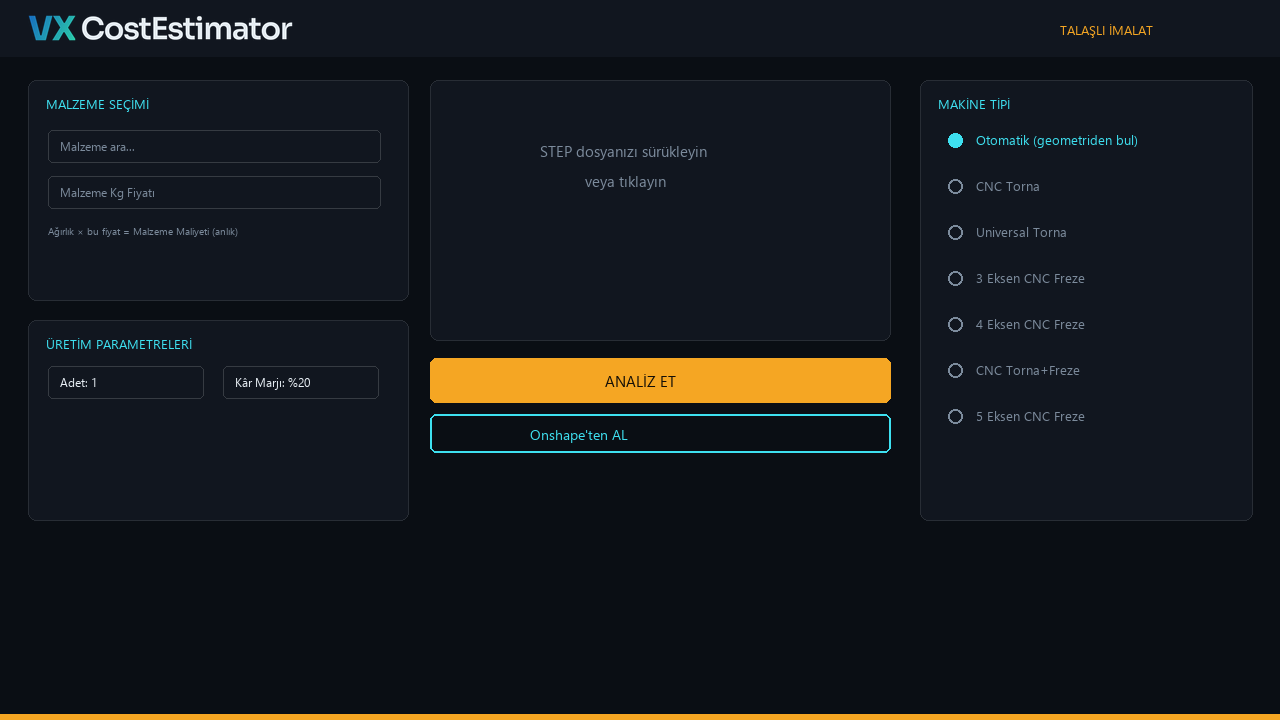
Analysis Done — Now the Outputs
The moment analysis finishes, you have three things in hand: a rotatable 3D model on screen, a numeric breakdown, and exportable files.
The PDF quote report includes company name, material, cost breakdown and a 3D screenshot, and can be sent straight to the customer. The BOM table exports to Excel; for sheet metal parts, the flat pattern is exported as DXF/DWG on separate layers.
Every module keeps its own history of past analyses; records reopen with a single click, and past quotes can be compared side by side to track pricing consistency.
3D Viewer
Rotatable 3D model; one click switches sheet metal parts to flat/bent view.
PDF Quote Report
A customer-ready report with an embedded 3D view.
Excel Export/Import
BOMs and price lists are managed in bulk through an Excel template.
DXF / DWG (Sheet Metal)
Cutting and bend layers stay separate and load straight into laser/punch programs.
Install Once on a Server, License Only the Modules You Need
The software runs on a server inside your local network; everyone connects from their own browser or desktop app. There's no cloud dependency, and your data stays on-premise.
VX CostEstimator ships modularly: Machining, Sheet Metal, Welded Fabrication and Assembly/BOM Analysis can each be licensed independently — you never pay for features you don't use.
About VX CostEstimator
VX CostEstimator is a VIAMETRIX software that analyzes your CAD model and automatically calculates manufacturing cost and quote pricing within minutes. It integrates directly with Creo Parametric, Creo Elements/Direct Modeling and Onshape.
It prices machining, sheet metal, welded fabrication and assembly/BOM analysis through four separate modules, each following its own manufacturing logic.
No. VX CostEstimator is developed in-house by VIAMETRIX. It integrates as an add-on inside Creo Parametric and Creo Elements/Direct Modeling, and connects to Onshape through the cloud.
Yes. The connection is established through Onshape's official OAuth 2.0 authorization flow; your password is never shared with VX CostEstimator.
VX CostEstimator is licensed modularly: Machining, Sheet Metal, Welded Fabrication and Assembly/BOM Analysis modules can be licensed independently. Licenses are hardware-locked (HWID) and defined by concurrent user count (N-seat).